

Quick Verdict
The HP Victus 15 is the honest, no-nonsense entry point into real PC gaming: genuine RTX graphics, a fast 144Hz screen and a sturdy build, at a price far below premium gaming laptops. It is not thin, not light, and its battery will not carry you through a day of gaming unplugged. Buy it if you want desktop-class games on a sensible budget; skip it if you need a laptop to carry everywhere all day.
Full Specs Table
| Specification | HP Victus 15 (2024–2025 line) |
|---|---|
| Display | 15.6-inch Full HD (1920 x 1080) IPS, up to 144Hz |
| Processor options | Intel Core i5-13420H / i7-13700H class (13th Gen) or AMD Ryzen 5 8645HS / Ryzen 7 8845HS class |
| Graphics options | NVIDIA GeForce RTX 4050 (6GB GDDR6) or RTX 4060 (8GB GDDR6) |
| RAM | 8GB or 16GB DDR5 (varies by configuration; upgradeable in most models) |
| Storage | 512GB or 1TB PCIe NVMe SSD (varies by configuration) |
| Battery | 70Wh on most configurations |
| Weight | Around 2.29kg (varies slightly by configuration) |
| Keyboard | Full-size backlit keyboard with numeric keypad |
| Connectivity | Wi-Fi 6E, Bluetooth, USB-C, USB-A, HDMI, Ethernet (exact ports vary by configuration) |
| Operating System | Windows 11 (Home or Pro depending on configuration) |
| Colours | Mica Silver, Performance Blue, Ceramic White (market dependent) |
Important note on this review: the Victus 15 is sold in many configurations, and HP changes the exact CPU, GPU, RAM, display brightness and battery by market and model year. Nothing in this review should be read as “every Victus 15 has this spec” — always check the exact configuration code on the listing you are buying. Where a spec varies, we say so plainly.
Design & Build
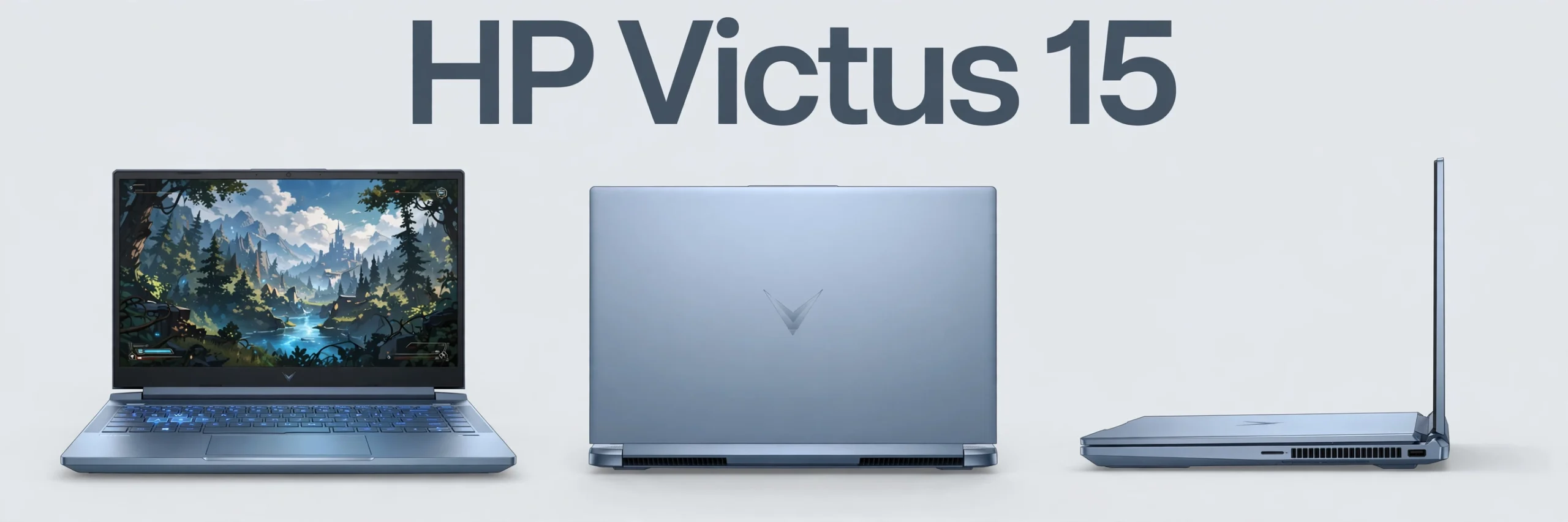
The Victus 15 looks like a gaming laptop that does not shout about it. The lid carries a subtle chrome “V” logo, the chassis is clean and understated, and in Mica Silver it could pass for an ordinary work laptop in a classroom or office — a genuine advantage for students and young professionals who do not want flashing RGB lights everywhere. The build is mostly plastic, but it feels solid, with little flex in the keyboard deck, and the hinge holds the screen firmly at any angle.
At around 2.29kg plus a chunky power brick, this is a “carry it in a backpack between home and university” laptop, not a “carry it in one hand all day” laptop. If portability is your top priority, our MacBook Air M4 review shows what the thin-and-light end of the market looks like — but it is not a gaming machine, and that is exactly the trade-off the Victus makes in the opposite direction.
Cooling uses dual fans with wide rear vents. Under gaming load the fans are audible — this is normal for a gaming laptop at this price — but the keyboard area stays comfortable, and HP’s thermal design keeps performance steady rather than throttling hard after a few minutes.
Display / Screen
Most Victus 15 configurations ship with a 15.6-inch Full HD IPS panel running at 144Hz, which is a big step up from the 60Hz screens on ordinary laptops: games look smoother, mouse movement feels more responsive, and fast scrolling is visibly cleaner. For competitive titles like Valorant, CS2 and Fortnite, the 144Hz refresh rate is a real advantage.
The honest caveat is that brightness and colour coverage vary by configuration. Some panels are brighter and more colour-accurate than others, and cheaper configurations may use a dimmer panel. If you also do photo or video editing, check the exact panel spec of your configuration before buying — and compare it with the brighter, sharper screen on the MacBook Air M4 if creative work matters more than gaming. For pure gaming, the Victus screen is good value.
Performance
This is where the Victus 15 earns its price. The RTX 4050 (6GB) configuration handles modern games comfortably at 1080p with medium to high settings, while the RTX 4060 (8GB) configuration goes further — higher settings, smoother frame rates, and more headroom for demanding titles and ray tracing. Both cards support NVIDIA DLSS, which uses AI upscaling to lift frame rates in supported games — a genuinely useful feature at this price.
The CPU options are both capable: Intel’s 13th Gen Core i5 and i7 chips and AMD’s Ryzen 5 and 7 8000-series chips all handle gaming, streaming, coding and office work without complaint. In practice, the GPU matters more than the CPU for gaming, so if you are choosing between configurations, prioritise the RTX 4060 over a CPU upgrade.
We deliberately give no benchmark numbers here: published figures vary by configuration, cooling and test conditions, and quoting one configuration’s numbers as if they applied to all Victus 15 models would mislead buyers. What we can say confidently is that this laptop plays current games well at 1080p, and that 8GB RAM configurations will struggle with modern titles — if your configuration ships with 8GB, plan a RAM upgrade, which is straightforward on most Victus models.
Ports & Parts
The Victus 15 is well connected for a laptop at this price: USB-C and USB-A ports, HDMI for an external monitor or TV, Ethernet for stable wired gaming, and a full-size backlit keyboard with a numeric keypad that students and accountants will appreciate. The keyboard has decent travel and a comfortable feel for long typing sessions, and the large touchpad is accurate for everyday use — though serious gamers will use a mouse anyway.
Upgradeability is a genuine strength: most Victus 15 models allow easy access to RAM and storage slots, so you can add memory or a second SSD later instead of paying for the top configuration today. This is one of the best reasons to buy this laptop — it grows with you. If you are building a full setup around it, our best gaming laptops under Rs. 300,000 in Pakistan guide compares it with rivals, and our RTX 5060 review explains the desktop graphics world it sits below.
Battery / Power
Battery life is the Victus 15’s weakest area, and buyers should know this before purchasing. For light work — browsing, documents, video streaming — most configurations last several hours, but under gaming load the battery drains fast and performance drops unless the charger is connected. This is true of almost every gaming laptop, but it is worth stating plainly: the Victus 15 is a laptop you use plugged in for gaming, and unplugged only for lighter tasks.
The 70Wh battery on most configurations is respectable for the class, and fast charging helps when you do need a top-up. Just do not buy this laptop expecting all-day unplugged use — that is not what it is built for.
Pros
- Real gaming graphics (RTX 4050 or 4060) at a mid-range price
- Solid 15.6-inch 144Hz display on most configurations
- Good keyboard and sturdy, understated build for the price
- Easy RAM and storage upgrades in most configurations
- DLSS support lifts frame rates in supported games
- Full-size keyboard with numeric keypad
Cons
- Battery life is short under gaming load — charger is essential
- Heavier than thin-and-light laptops at around 2.3kg
- Display brightness and colour coverage vary by configuration
- Some configurations ship with only 8GB RAM, which limits modern games
- Fans are audible under heavy load
Price in Pakistan, India, UAE, USA, UK
Prices vary so widely by configuration — RTX 4050 versus 4060, 8GB versus 16GB RAM, Intel versus AMD — that quoting a single figure would be misleading. The table below therefore uses “—” for every market, with buying guidance instead of invented numbers.
| Country | Price | Notes |
|---|---|---|
| Pakistan | — | Varies widely by configuration and importer; check current listings for the exact model code |
| India | — | Varies by configuration; RTX 4050 models sit well below RTX 4060 models |
| UAE | — | Varies by configuration; check Dubai retailer listings |
| USA | — | Varies by configuration; Best Buy and HP store models differ |
| UK | — | Varies by configuration; check the exact Victus 15 model code |
As a buying rule: an RTX 4050 configuration should cost clearly less than an RTX 4060 one, and a 16GB RAM model is worth paying extra for over an 8GB model. If a seller cannot tell you the exact CPU, GPU and RAM of the unit, do not buy it.
Who Should Buy, Who Should Skip
Buy the Victus 15 if: you want to play modern PC games at 1080p on a sensible budget, you are a student who needs one laptop for study and gaming, you value upgradeability, and you mostly use the laptop plugged in at a desk.
Skip it if: you need all-day battery life, you carry your laptop everywhere and weight matters, or your work is mostly creative — in that case a thin-and-light machine like the MacBook Air M4 or a brighter-screened laptop from our best laptops for students in Pakistan guide will suit you better.
Final Verdict
The HP Victus 15 does exactly what a budget gaming laptop should do: it puts real gaming hardware — RTX graphics, a fast screen, upgradeable internals — ahead of thinness, lightness and battery life. Its weaknesses are honest and predictable, not hidden. For students and first-time PC gamers, it remains one of the best value gaming laptops you can buy.
★★★★☆ Our Rating: 7.8/10
- Design & Build: 7.6/10
- Display: 7.8/10
- Performance: 8.2/10
- Battery: 7.0/10
- Value for Money: 8.2/10
FAQs
Is the HP Victus 15 good for gaming?
Yes. With RTX 4050 or 4060 graphics it plays modern games well at 1080p, and DLSS support helps further in supported titles. The RTX 4060 configuration is the better long-term choice if your budget allows.
How much RAM does the Victus 15 need for gaming?
16GB is the practical minimum for modern games. Some configurations ship with 8GB, which will limit performance — plan an upgrade if you buy one of those.
Can I upgrade the RAM and storage on the Victus 15?
On most configurations, yes. RAM and SSD slots are accessible, making this one of the most upgrade-friendly gaming laptops at its price. Confirm for your exact model code before opening the chassis.
Is the Victus 15 good for students?
Yes, with one condition: it is heavy and its battery is short under gaming load. As a desk-based study-and-gaming machine it is excellent value; as an all-day carry-everywhere laptop it is not ideal.
Does every Victus 15 have the same specs?
No. CPU, GPU, RAM, storage, display brightness and even battery vary by configuration and market. Always check the exact model code and configuration on the listing before buying.